G-W Assessment Schoology: Connecting Your Schoology Course to G-W Assessment

Last updated: Aug 03, 2026
1095
views

Upon logging into Schoology, navigate to your respective course where G-W Assessment has been integrated by your LMS administrator.
Important Note: Only one instructor can connect to G-W Assessment per course. Co-teachers and multiple course instructors in a single G-W Assessment course are not currently supported.
- Select the "G-W Assessment" application (name may vary depending on how this was set up by your LMS admin) in the left navigation bar with your course.

- Select the "Connect" button on the It’s time to connect your LMS Course to GW Assessments section on your screen.

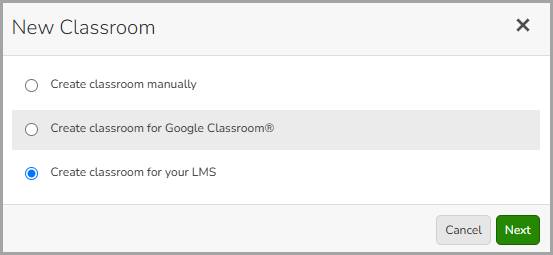
- In the New Classroom modal, select "Create classroom for your LMS" then select the "Next" button.
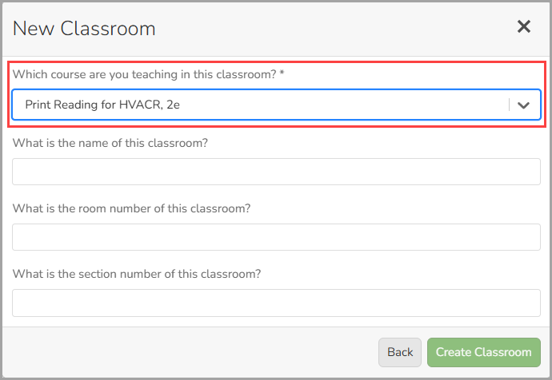
- From the drop down, select the course you will be using with your class.
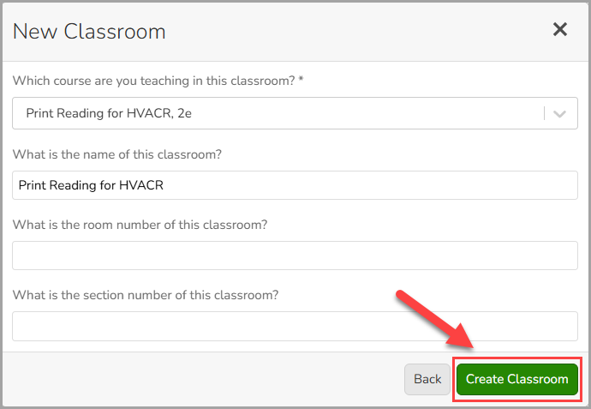
- Enter the name for your classroom then select the "Create Classroom" button. You can also add a room number and section or leave those fields blank.