


-
After selecting “Content” from the Dashboard, select “Open”.

-
Select a Chapter/Unit and select “Open”.

-
Select a Resource/Assignment and select “Assign”.

-
Complete the assignment details (Assign to, Date Range, Reports and Grading, and Student Instructions) and select “Assign”.
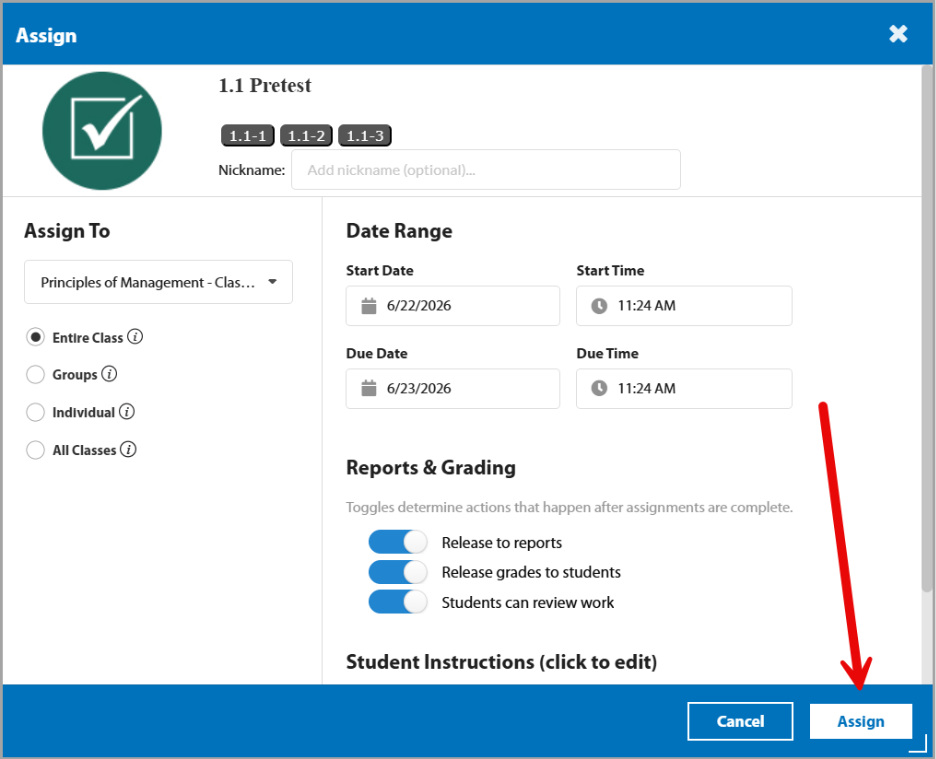
1. Assign To: Instructors may assign a single assignment to an entire class, to individual students, or to multiple classes.
2. Date Range: Instructors may select a start date and time as well as a due date and time.
3. Reports & Grading: Instructors may decide whether or not to release the score from this assignment to reports, release grades to students, and whether or not students may review their work before submission.
4. Student Instructions: Instructors may provide specific instructions to students for clarity.
5. You can now view the assignment within the "Grade Review" button on the right.


